Get Started with RMM API
Managed Backup enables interaction with backend features using the RMM API. The API provides a set of requests that can be incorporated into user automation workflow or various remote management solutions.
RMM API is not available if you are using RMM Community Edition.
This feature requires RMM API tokens generated.
This chapter covers the following topics:
- Access Requirements
- Add RMM API Tokens
- Revoke RMM API Tokens
- Test API Requests
- RMM API Metods
- Integration Scenarios
Access Requirements
Generating RMM API tokens is available only for provider accounts with a valid RMM license.
API Credentials
To start using RMM API, perform the following steps:
- Add RMM API token for an administrator.
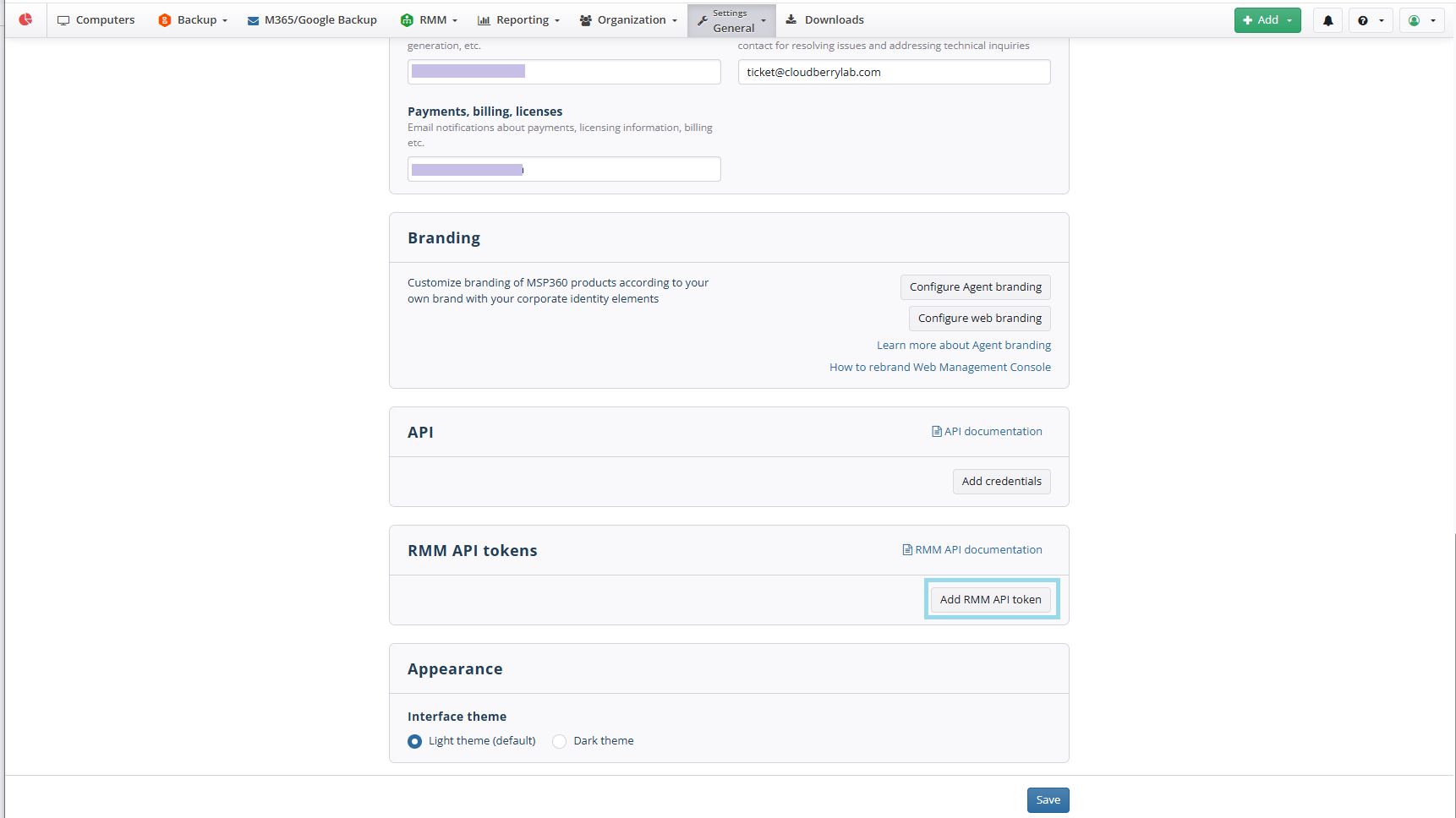
- Navigate to RMM API tokens area on Setting > General.
- Click Add RMM API token and select the administrator who will use the token. Save the selection.
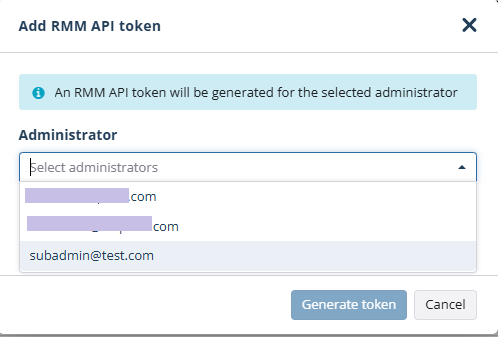
- Save the settings.
If the RMM API Tokens option is unavailable, verify that the selected administrator has an assigned RMM license.
Revoke API Tokens
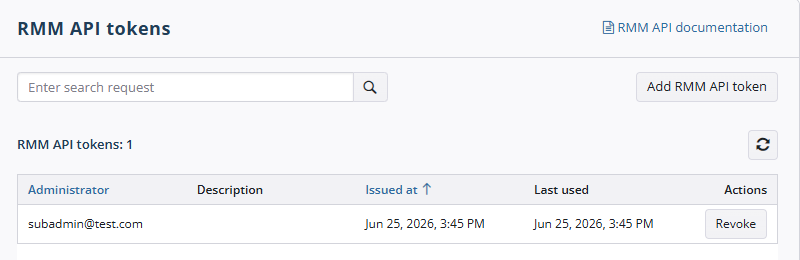
Generated RMM API Tokens can be revoked in RMM API tokens area on Setting > General, if needed.
- Navigate to RMM API tokens area on Setting > General.
- Click Revoke next to the token you want to revoke.
- Confirm this action.
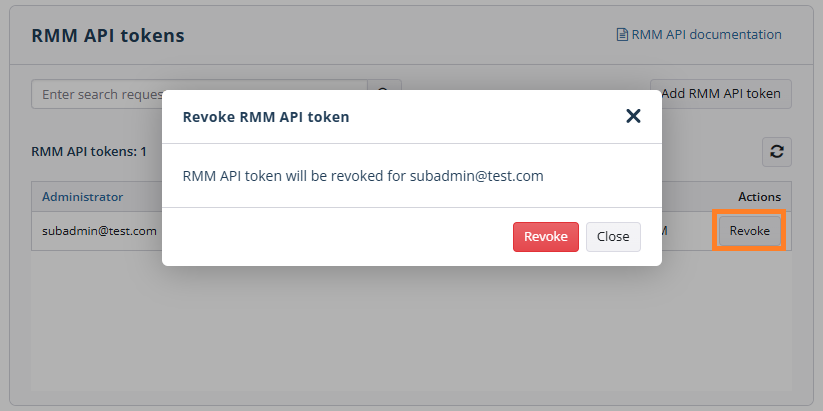
- The administrator for whom this token will be generated can no longer use RMM API with this token.
Test API Requests
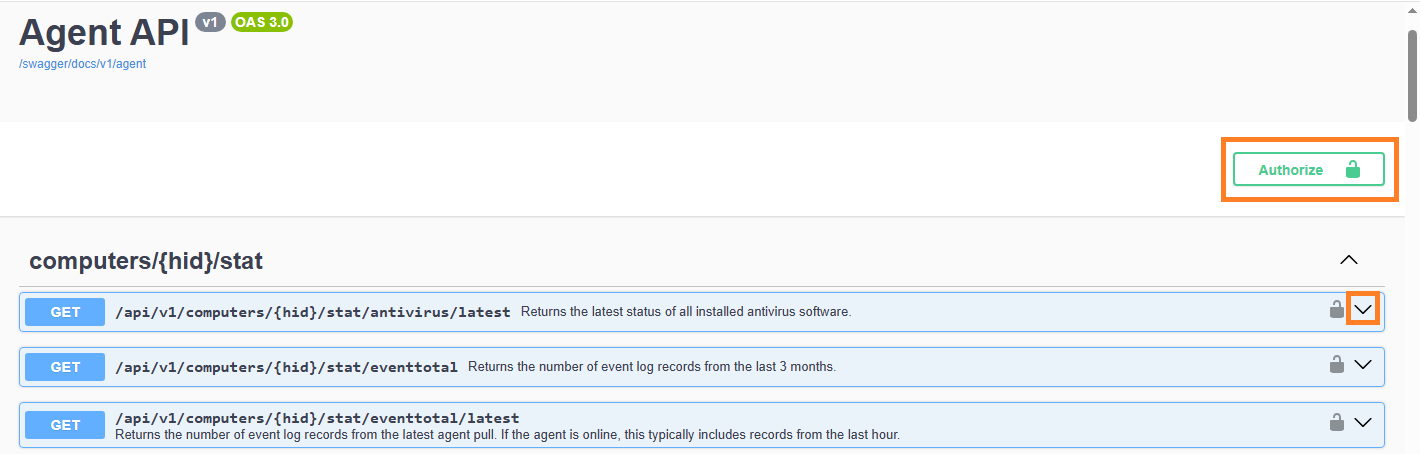
You can create test API requests using the Swagger tool.
The Swagger is located at https://api.rmm.mspbackups.com/swagger/
Be aware that the link to Swagger is case-sensitive and must always be as follows: https://api.rmm.mspbackups.com/swagger/index.html
To learn more about Swagger, refer to the https://swagger.io/ resource
Use generated RMM API token to authorize, then expand the required method.
RMM API Methods
For most integrations, use the fleet-wide endpoints rather than querying individual devices.
Each statistics type is available through two endpoint variants:
| Endpoint | Description | Recommended use |
|---|---|---|
| /api/v1/computers/stat//latest | Fleet-wide: Returns paginated data for every managed device | Recommended for dashboards, reporting, synchronization, and monitoring |
| /api/v1/computers//stat//latest | Per-Device: Returns data for a single device by HID | Use only when retrieving additional details for a specific device |
Using fleet-wide endpoints significantly reduces the number of API requests and eliminates the need to iterate through every managed device.
For the polling cadence, and rate-efficiency recommendations refer to the RMM API Best Practices article.
Fleet-Wide Endpoints (computers/stat)
| Method | Endpoint | Description |
|---|---|---|
| GET | /api/v1/v1/computers/stat/antivirus/latest |
Returns the latest status of all installed antivirus software |
| GET | /api/v1/computers/stat/eventtotals/latest |
Returns the number of event log records from the latest agent pull. If the agent is online, this typically includes records from the last hour |
| GET | /api/v1/computers/stat/hardware/latest |
Returns all hardware devices installed on all managed computers |
| GET | /api/v1/computers/stat/hdd/latest |
Returns all local drives |
| GET | /api/v1/computers/stat/hddsmart/latest |
Returns SMART data for all local drives |
| GET | /api/v1/computers/stat/host/latest |
Returns system information including OS details, system type, manufacturer, model, serial number, IP/MAC addresses, time zone, location, and CPU temperature |
| GET | /api/v1/computers/stat/hyperv/latest |
Returns all virtual machines from Microsoft Hyper-V |
| GET | /api/v1/computers/stat/memory/latest |
Returns memory information including physical memory size, virtual memory size, and available physical memory (KB) |
| GET | /api/v1/computers/stat/printer/latest |
Returns all installed printers |
| GET | /api/v1/computers/stat/runtime/latest |
Returns a process tree with CPU usage (%) and memory usage (KB) |
| GET | /api/v1/computers/stat/service/latest |
Returns services or daemons with startup type and current status |
| GET | /api/v1/computers/stat/software/latest |
Returns all installed software, including names, architecture, and related details. May take some time to complete |
| GET | /api/v1/computers/stat/summary/latest |
Returns a system summary including CPU usage, memory usage, disk usage, antivirus status, software update status, SMART status, and active/recent alerts |
| GET | /api/v1/computers/stat/update/latest |
Returns all installed software updates, including names, architecture, and related details. May take some time to complete |
Per-Device Endpoints (`computers/
| Method | Endpoint | Description |
|---|---|---|
| GET | /api/v1/computers/{hid}/stat/antivirus/latest |
Returns the latest status of all antivirus software installed on the specific device |
| GET | /api/v1/computers/{hid}/stat/eventtotals |
Returns the number of event log records from the last 3 months |
| GET | /api/v1/computers/{hid}/stat/eventtotals/latest |
Returns the number of event log records from the latest agent pull. If the RMM Agent is online, this typically includes records from the last hour |
| GET | /api/v1/computers/{hid}/stat/hardware/latest |
Returns all hardware devices installed the specified device |
| GET | /api/v1/computers/{hid}/stat/hdd/latest |
Returns all local drives of the specified device |
| GET | /api/v1/computers/{hid}/stat/hddsmart/latest |
Returns SMART data for all local drives of the specified device |
| GET | /api/v1/computers/{hid}/stat/host/latest |
Returns system information including OS details, system type, manufacturer, model, serial number, IP/MAC addresses, time zone, location, and CPU temperature of the specified device |
| GET | /api/v1/computers/{hid}/stat/hyperv/latest |
Returns all virtual machines from Microsoft Hyper-V on the specified device |
| GET | /api/v1/computers/{hid}/stat/memory/latest |
Returns memory information including physical memory size, virtual memory size, and available physical memory (KB) of the specified device |
| GET | /api/v1/computers/{hid}/stat/printer/latest |
Returns all printers available for the specific device |
| GET | /api/v1/computers/{hid}/stat/runtime/latest |
Returns a process tree with CPU usage (%) and memory usage (KB) of the specified device |
| GET | /api/v1/computers/{hid}/stat/service/latest |
Returns services or daemons with startup type and current status of the specified device |
| GET | /api/v1/computers/{hid}/stat/software/latest |
Returns all installed software, including names, architecture, and related details of the specified device. May take some time to complete |
| GET | /api/v1/computers/{hid}/stat/summary/latest |
Returns a system summary including CPU usage, memory usage, disk usage, antivirus status, software update status, SMART status, and active/recent alerts of the specified device |
| GET | /api/v1/computers/{hid}/stat/update/latest |
Returns all installed software updates, including names, architecture, and related details of the specified device. May take some time to complete |
Integration Scenarios
Refer to the following articles for the integration scenarios for administrators, with the endpoints, polling patterns, and limits behind each one:
- Asset & inventory sync (CMDB + PSA)
- Patch & Windows update status monitoring
- Live dashboard (Grafana)
- BI / data warehouse export (PowerBI)
- Auto-create ticket in PSA upon RMM alert
- Security Operations Center live view
- Native report publishing for clients
- IT Ops Center TV wallboard
- SLA / QBR client-facing dashboard
- Backup job status monitoring (Managed Backup)