Products: Managed Backup (Agent), Managed Backup (Web)
Article ID: m0779
Allocate Licenses
By default, licenses are automatically allocated to users from the global pool unless you deliberately limit available licenses by editing the company settings on Organization > Companies.
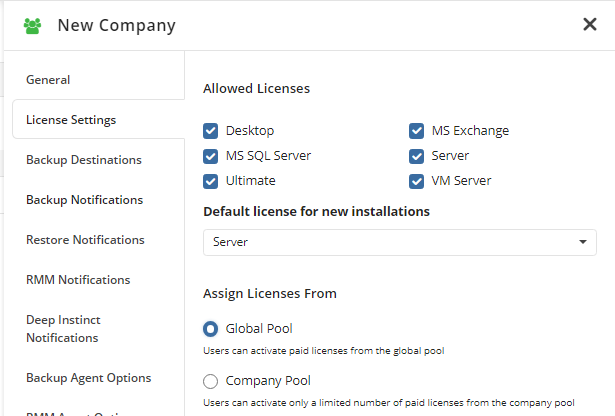
Every user is assigned to a particular company, and if the company pool is selected in the company settings, the global pool licensing policy will be overridden by the company licensing policy.
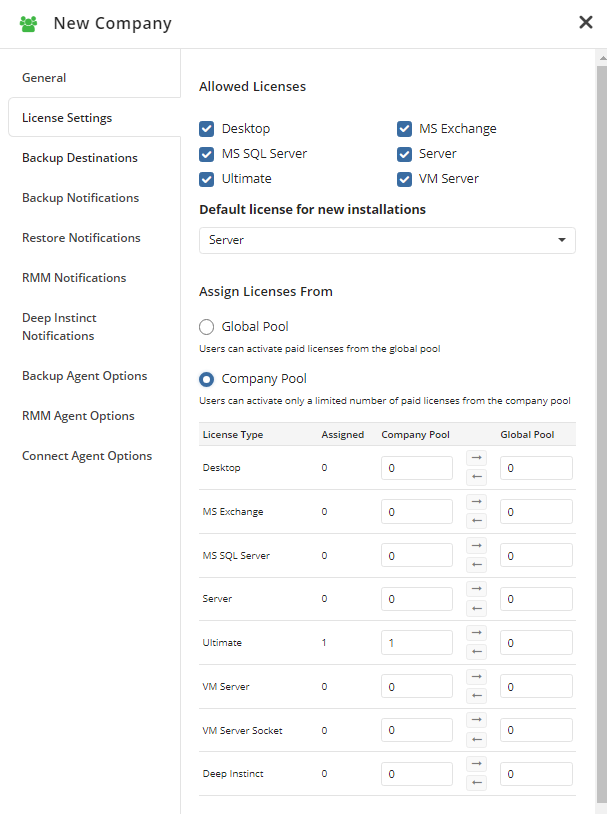
When editing a company's settings, you can select among the following licensing options:
- Global Pool (Default). With this option selected, paid licenses allocated to new users are obtained from the global (provider's) license pool.
- Company Pool. This option enables you to grant a specific number of licenses to a company. With this option selected, licenses granted to computers within this company are obtained from this company's pool. The total number of licenses granted to all of your companies cannot exceed the total number of licenses available to you in the global pool.
Once the licensing policy is configured for all users and companies, subsequent license allocation will occur automatically according to the policy.