Products: Managed Backup (Agent), Managed Backup (Web), Licensing / Sales
Article ID: m0782Last Modified: 04-Oct-2026
Change Licenses
To change a license:
- Open the Management Console.
- On Computers, select the computer whose license you want to change.
- Click the license information link in the Backup column.
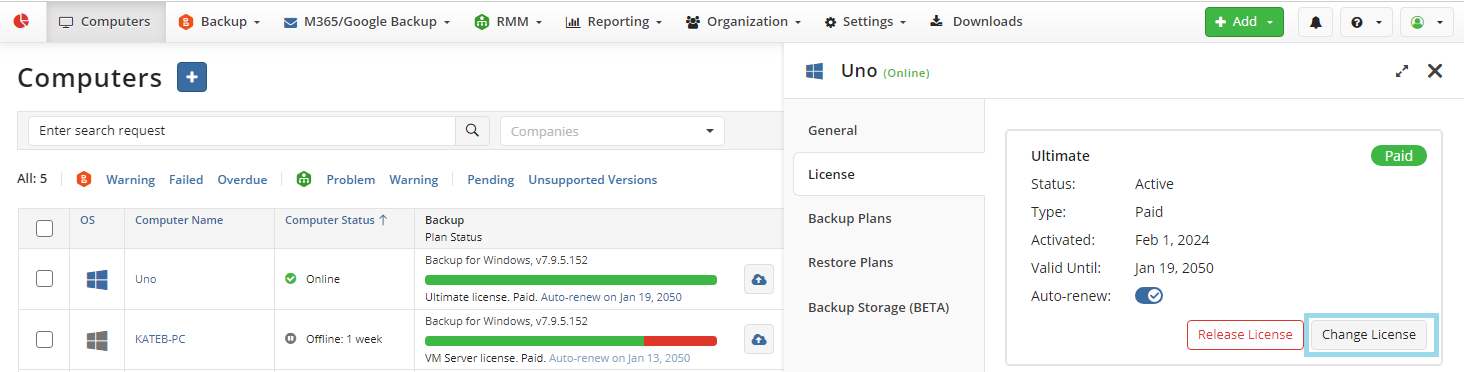
- On the License tab of the side panel, click Change License.
- In the Change License dialog box, edit the license type, then select one of the available options.
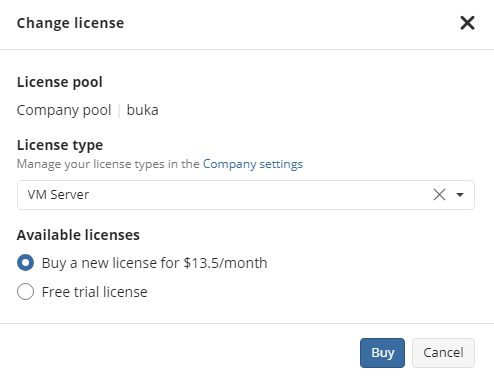
The following options can be available depending on your role:
- Use a paid license, if any
- Use a free trial for 15 days
- Buy a new license
- Withdraw a license from another pool
If you choose to withdraw a license from another pool, this license will no longer be available in that pool.