Article ID: m0713Last Modified: 05-Oct-2026
Bare-Metal Recovery with Managed Backup
What Is Bare-Metal Recovery?
Bare-Metal Recovery (or Bare-Metal Restore, or BMR) is a way to recover a source computer on a target computer with no installed operating system, also called a bare-metal machine. To do this, you need a backup of the system image (a complete copy of your source computer) to restore everything as it was.
When Do You Need Bare-Metal Recovery?
You might need Bare-Metal Recovery in these situations:
- After a ransomware attack.
- When your computer hardware fails.
- In disaster recovery scenarios.
- To set up multiple computers with the same configuration using a master image.
Basic Bare Metal Recovery Scenarios
Management Console
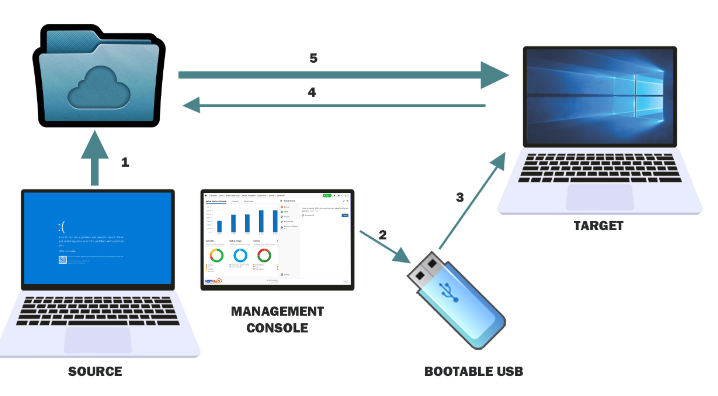
- Ensure a successful image-based backup is available in backup storage.
- Create a bootable USB drive or ISO image using the Bootable USB tab of the Downloads panel.
- Boot the target machine from the bootable USB or ISO image.
- Create a restore plan.
- Wait for the restore plan to complete successfully.
Backup Agent
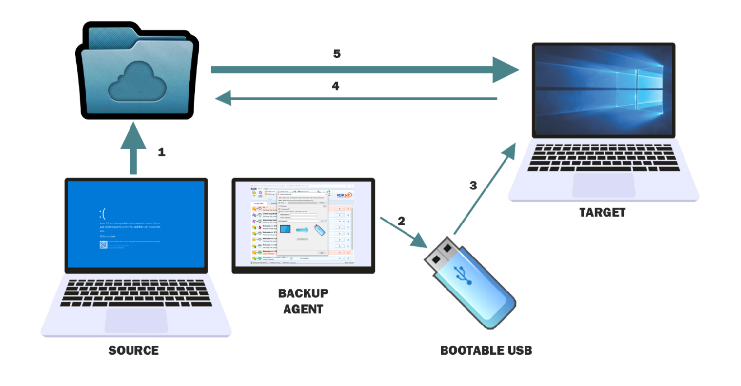
- Ensure a successful image-based backup is available in backup storage.
- Create a bootable USB drive or ISO image using Backup Agent.
- Boot the target machine from the bootable USB or ISO image.
- Create a restore plan.
- Wait for the restore plan to complete successfully.
What You Need for Bare-Metal Recovery?
- A successful image-based backup of the source computer
- A Bare-Metal Recovery USB drive or ISO image file
- An internet connection (Ethernet) to access the Management Console and the backup storage where the successful image-based backup of the source computer is stored.
- A valid trial or paid Backup license
Bare-Metal Recovery Options with Managed Backup
- Option 1. Combined Local/Remote Bare-Metal Recovery (recommended):
- Some steps must be done by someone near the target computer.
- Most of the recovery steps can be performed via the Management Console using a web-based Connect session.
- Internet access (Ethernet) is required.
- Option 2. Local Bare-Metal Recovery:
- Recovery happens on-site using local backup storage.
- Internet access (Ethernet) is required.
- Option 3. Remote Bare-Metal Recovery to a Secondary Disk:
- Any machine with Backup Agent can be used to restore an image from a backup to a secondary disk. The disk needs to be attached via the SATA interface. After the restore is finished, the disk can be installed into the target system.
- Internet access (Ethernet) is required.
References:
Combined Local/Remote Bare-Metal Recovery
- Create bootable USB media
- (Optional) Add boot-critical drivers
- Perform Bare-Metal Recovery using the instructions in this document.
Local Bare-Metal Recovery
- Create bootable USB media
- (Optional) Add boot-critical drivers
- Perform local Bare-Metal Recovery using the instructions in this document.
Remote Bare-Metal Recovery to a Secondary Disk
- Connect an HDD or SSD drive to the source computer using a SATA connection. Ensure Backup Agent is installed on the computer and has an MSP360 user account with access to the backup destination where the successful image-based backup of the source computer is stored.
- Follow the restore procedure described in the article using the Restore as physical disk option.
- Once the restore process is complete, install the drive into the target machine and configure the system to boot from this drive.