Beta Releases of MSP360 Products
Beta Software Disclaimer
The beta release of an MSP360 product is intended for evaluation and testing purposes only. It is not covered by the same stability, performance, or compatibility guarantees as a generally available (GA) release.
The beta software may contain defects, incomplete features, or other issues that could affect functionality, performance, or data integrity. Do not use it in production or mission-critical environments. We strongly recommend installing it in a test environment and ensuring that all important data is backed up before use.
This beta software is provided "as is" without warranties of any kind, express or implied. Features and functionality may change before the final release, and the beta software may be modified or discontinued at any time without prior notice.
Your feedback is essential to improving the product. If you encounter any issues or have suggestions, please report them to the MSP360 Support team.
Upcoming Beta Releases
Windows
Backup Agent 8.7.5 for Windows
- Hybrid backup scheme
- Restore process from the Backup Storage tab, where you can browse all available backup data. From there, you can:
- Perform granular recovery from image-based backups.
- Perform granular recovery from virtual machine backups (Proxmox, VMware, Hyper-V).
- Search and restore data from file-level backups.
- Restore backups to a virtualization platform (Proxmox, VMware, Hyper-V).
- Perform Instant Restore of image-based backup plans to Proxmox or Hyper-V.
- Restore directly to AWS or Azure.
Backup Agent 8.8.5 or later for Windows
- Synthetic Full schedule. Synthetic Full creates a new restore point with a later date using existing full-backup data. This helps reduce storage usage and remove obsolete data. Because this operation is resource-intensive, it should be performed infrequently. Synthetic Full scheduling is available for backup plans in the new backup format.
- Enhanced metadata download performance. Improved performance when downloading backup metadata (formerly known as deep sync).
- Restore to another computer support. Allows you to use Backup Storage Browser to perform restore from online and offline computers to other computers with Backup Agent 8.8.5 or later installed.
- Browse offline computers. Added the ability to browse an offline computer through an online computer using the 'Add different computer' functionality.
- Improved the Computers page performance.
- Instant Restore for virtual machines. Instantly restore VM backup plans to Proxmox or Hyper-V.
How to Request Beta Functionality
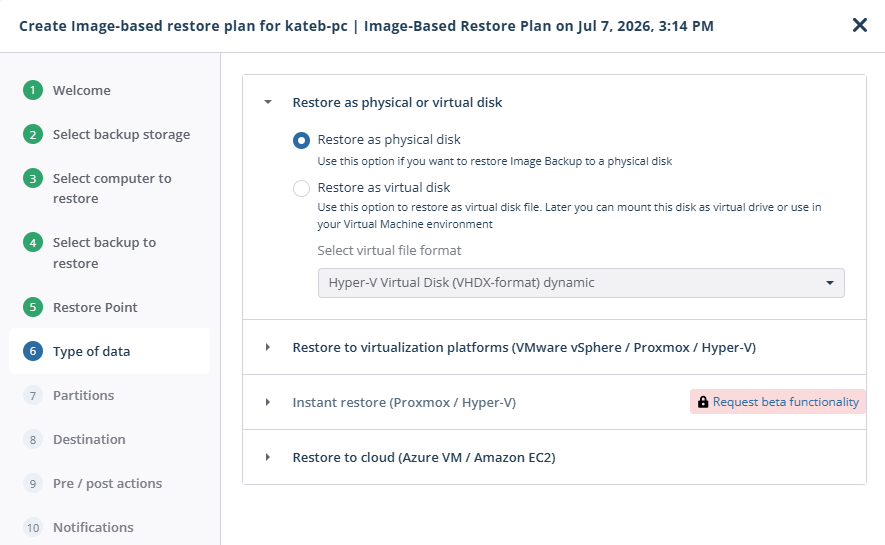
Click Request beta functionality to request a private beta installation package for temporary testing.
When the beta installation package becomes available, it will appear on the appropriate Downloads tab.
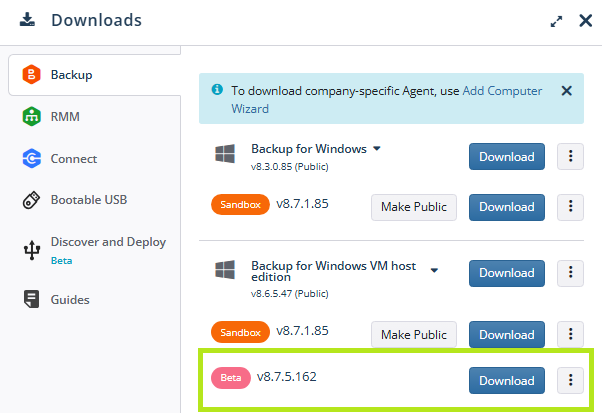
You can use this beta version without a license for a limited evaluation period. When the evaluation period expires, you will be prompted to download and install a public or sandbox build with a valid license. If you do not install a build with a valid license, your backup plans will be suspended.