GFS Policy Usage Examples
This chapter contains several basic examples of GFS retention policy usage with different retention periods configured for backups. With these examples, you will be able to configure the GFS policy following your business model.
- GFS Yearly, Monthly, and Weekly Enabled
- GFS Yearly and Monthly Enabled
- GFS Yearly and Weekly Enabled
- GFS Monthly and Weekly Enabled
- GFS Yearly Enabled
- GFS Monthly Enabled
- GFS Weekly Enabled
GFS Yearly, Monthly, and Weekly Enabled
This example displays the GFS retention period assignment logic when all retention periods are enabled in GFS settings.
Prerequisites: weekly, monthly, and yearly GFS retention periods are enabled on April 10, 2018, with the following GFS retention settings: yearly restore points are kept for 2 years, monthly restore points are kept for 3 months, and weekly restore points are kept for 2 weeks. The month of the first yearly successful backup (restore point) is April. The general retention policy settings: keep backup for one week.
The backup tree with the GFS restore point is displayed for June 25, 2019.
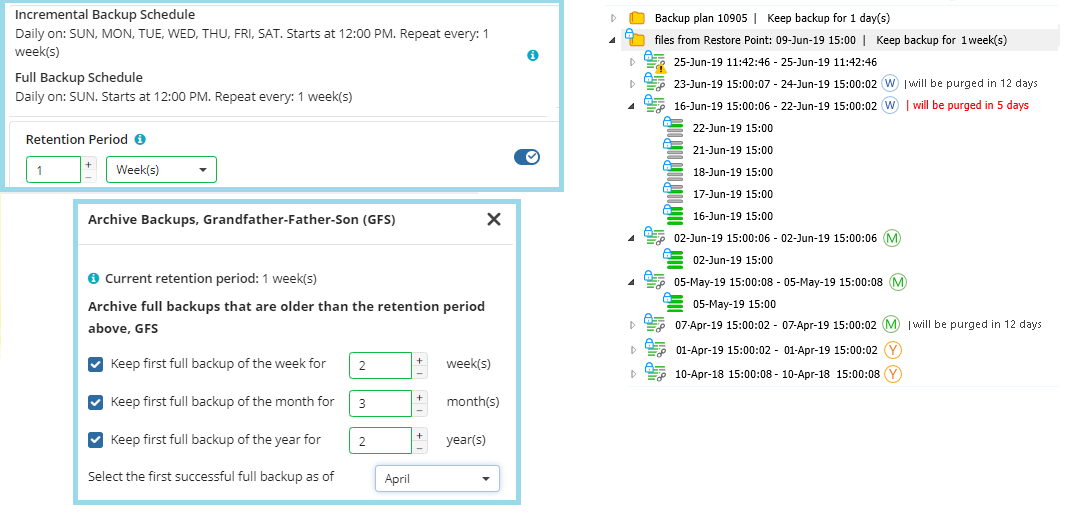
In this example, the following restore points are kept in backup storage under GFS retention:
- The yearly restore point of April 10, 2018 (the first successful one in the yearly period)
- The yearly restore point of April 1, 2019 (the first successful one in the next yearly period)
- The monthly restore point of April 7, 2019 (the first successful one in April 2019)
- The monthly restore point of May 5, 2019 (the first successful one in May 2019)
- The monthly restore point of June 2, 2019 (the first successful one in June 2019)
- The weekly restore point of June 16, 2019 (the successful restore point on the third Sunday of June 2019)
- The weekly restore point of June 23, 2019 (the successful restore point on the fourth Sunday of June 2019)
All previous weekly and monthly restore points are already purged according to the GFS policy and the regular retention policy settings.
| Top |
GFS Yearly and Monthly Enabled
This example displays the GFS retention period assignment logic when yearly and monthly retention periods are enabled in GFS settings (weekly periods are disabled).
Prerequisites: monthly and yearly GFS retention periods are enabled on April 10, 2018, with the following GFS retention settings: yearly restore points are kept for 2 years and monthly restore points are kept for 3 months. The month of the first yearly successful backup (restore point) is April. The general retention policy settings: keep backup for 2 weeks.
The backup tree with the GFS restore point is displayed for June 25, 2019.
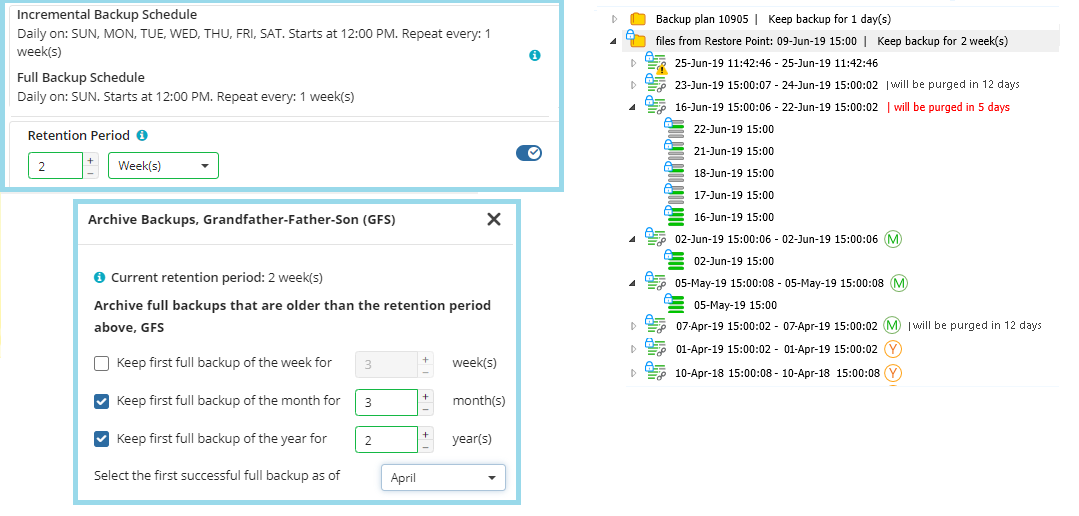
In this example, the following restore points are kept in backup storage under GFS retention:
- The yearly restore point of April 10, 2018 (the first successful one in a yearly period)
- The yearly restore point of April 1, 2019 (the first successful one in the next yearly period)
- The monthly restore point of April 7, 2019 (the first successful one in April 2019)
- The monthly restore point of May 5, 2019 (the first successful one in May 2019)
- The monthly restore point of June 2, 2019 (the first successful one in June 2019)
All previous monthly restore points are already purged according to the GFS policy and the regular retention policy settings.
| Top |
GFS Yearly and Weekly Enabled
This example displays the GFS retention period assignment logic when yearly and weekly retention periods are enabled in GFS settings (monthly periods are disabled).
Prerequisites: weekly and yearly GFS retention periods are enabled on April 10, 2018, and the month of the first yearly successful backup (restore point) is April. The general retention policy settings: keep backup for 1 week.
The backup tree with the GFS restore point is displayed for June 25, 2019.
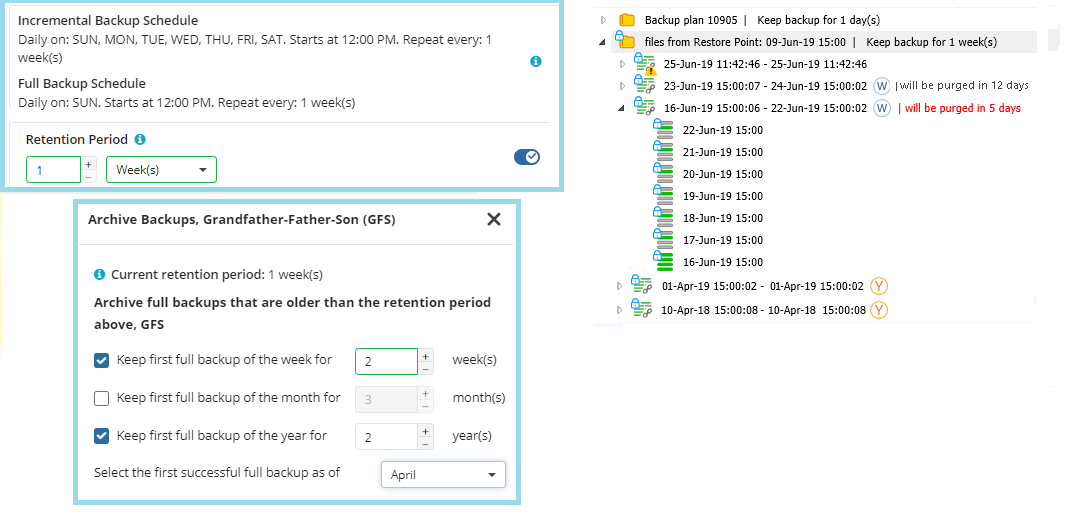
In this example, the following restore points are kept in backup storage:
- The yearly restore point of April 10, 2018 (the first successful one in a yearly period)
- The yearly restore point of April 1, 2019 (the first successful one in the next yearly period)
- The weekly restore point of June 16, 2019 (the successful restore point on the third Sunday of June 2019)
- The weekly restore point of June 23, 2019 (the successful restore point on the fourth Sunday of June 2019)
All previous weekly restore points are already purged according to the GFS policy and the regular retention policy settings.
A yearly restore point is kept in backup storage for the specified number of years. The GFS retention period for this restore point remains the same even if the GFS policy is disabled or changed.
For the yearly GFS retention period, full backups must be scheduled at least once a month.
All previous weekly restore points are already purged according to the GFS policy and the regular retention policy settings.
| Top |
GFS Monthly and Weekly Enabled
This example displays the GFS retention period assignment logic when monthly and weekly retention periods are enabled in GFS settings (yearly periods are disabled).
Prerequisites: monthly and weekly GFS retention periods are enabled on April 10, 2018. The general retention policy settings: keep backup for 1 week.
The backup tree with the GFS restore point is displayed for June 25, 2019.
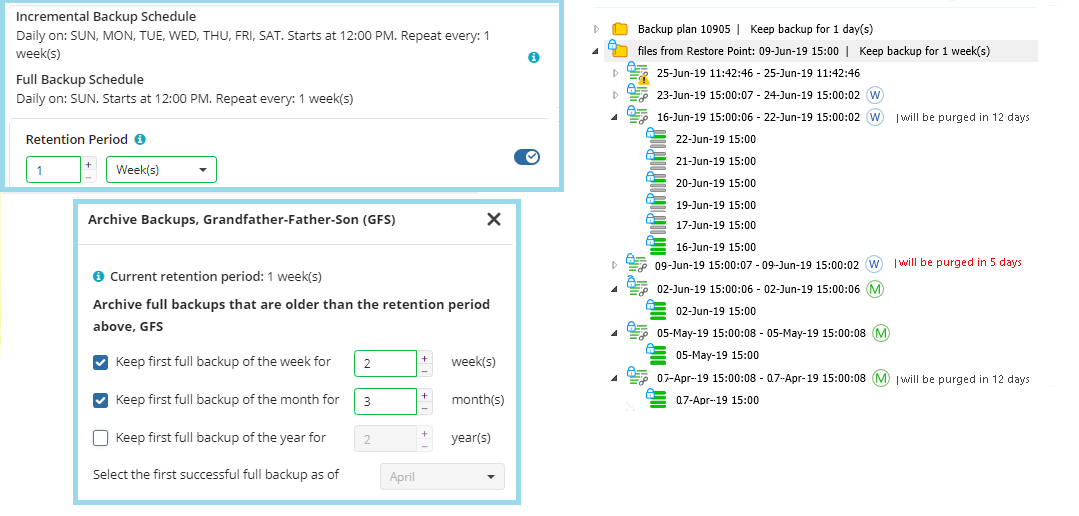
- The monthly restore point of April 7, 2019 (the first successful one in April 2019)
- The monthly restore point of May 5, 2019 (the first successful one in May 2019)
- The monthly restore point of June 2, 2019 (the first successful one in June 2019)
- The weekly restore point of June 16, 2019 (the successful restore point on the third Sunday of June 2019)
- The weekly restore point of June 23, 2019 (the successful restore point on the fourth Sunday of June 2019)
All previous monthly and weekly restore points are already purged according to the GFS policy and the regular retention policy settings.
| Top |
GFS Yearly Enabled
This example displays the GFS retention period assignment logic when only yearly retention periods are enabled in GFS settings (monthly and weekly periods are disabled).
Prerequisites: yearly GFS retention periods are enabled on April 10, 2018, with 2-year retention, and the month of the first yearly successful backup (restore point) is April. The general retention policy settings: keep backup for 2 weeks.
The backup tree with the GFS restore point is displayed for June 25, 2019.
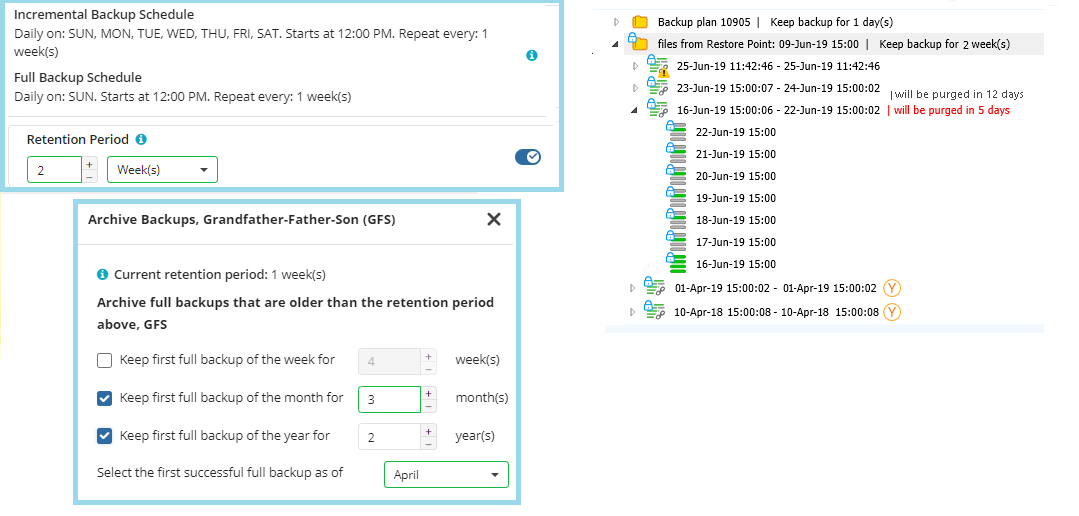
To avoid selecting the yearly restore points in a row, consider setting the current month for the yearly GFS restore point selection when you enable the GFS policy.
The first successful restore point that complies with the GFS policy and with user settings (you can select the month from which the yearly restore point will be selected) is selected as yearly.
| Top |
GFS Monthly Enabled
This example displays the GFS retention period assignment logic when only monthly retention periods are enabled in GFS settings (yearly and weekly periods are disabled).
Prerequisites: monthly GFS retention periods are enabled on April 10, 2018, with 3-month retention. The general retention policy settings: keep backup for 2 weeks.
The backup tree with the GFS restore point is displayed for June 25, 2019.
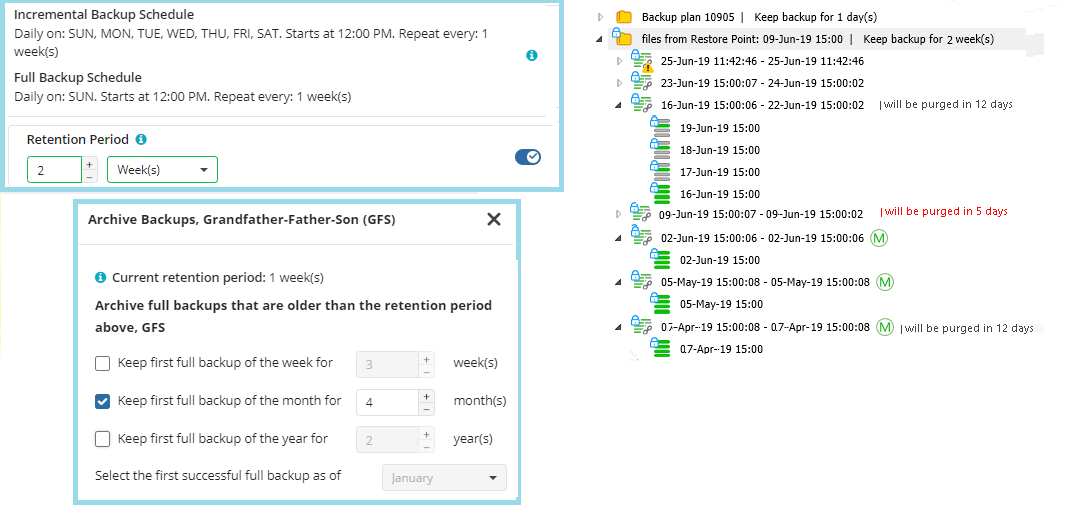
- The monthly restore point of April 7, 2019 (the first successful one in April 2019)
- The monthly restore point of May 5, 2019 (the first successful one in May 2019)
- The monthly restore point of June 2, 2019 (the first successful one in June 2019)
All previous monthly restore points are already purged according to the GFS policy and the regular retention policy settings.
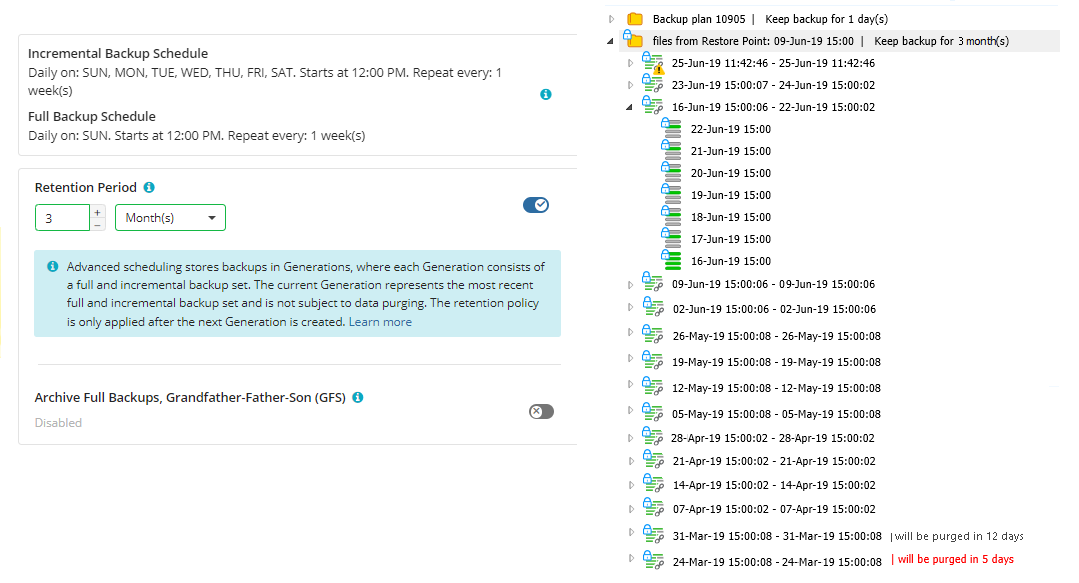
For the monthly GFS retention period, full backups must be scheduled at least once a month.
For reference, view the example of a backup tree with the same prerequisites and the GFS policy disabled.
| Top |
GFS Weekly Enabled
This example displays the GFS retention period assignment logic when only weekly retention periods are enabled in GFS settings (yearly and monthly periods are disabled).
Prerequisites: weekly GFS retention periods are enabled on April 10, 2018, with 4-week retention. The general retention policy settings: keep backup for 1 week.
The backup tree with the GFS restore point is displayed for June 25, 2019.
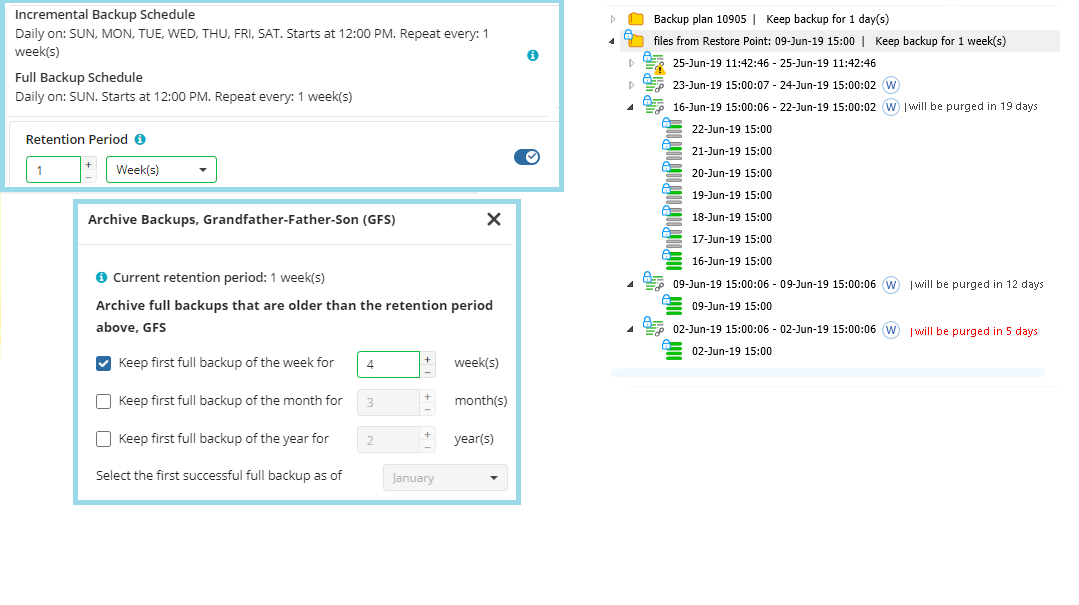
- The weekly restore point of June 2, 2019 (the successful restore point on the first Sunday of June 2019)
- The weekly restore point of June 9, 2019 (the successful restore point on the second Sunday of June 2019)
- The weekly restore point of June 16, 2019 (the successful restore point on the third Sunday of June 2019)
- The weekly restore point of June 23, 2019 (the successful restore point on the fourth Sunday of June 2019)
All previous weekly restore points are already purged according to the GFS policy and the regular retention policy settings.
For the weekly GFS retention period, full backups must be scheduled at least once a week.
A weekly restore point is marked once a week, on Sunday.
| Top |